
Our Vision and Mission #
This section is currently empty in the source workbook. Add your company’s vision and mission statement here.
Onboarding Process #
Employees / Interns / Consultants #
- Offer Letter Issuance (HR) — Issue the offer letter and obtain acceptance from the candidate.
- Document Collection (HR) — Collect required documents such as PAN copy and professional photo.
- Bank Account Creation (HR) — Provide bank POC and get the employee’s bank account created.
- Hirameki-Specific Mail ID (HR / Interns / Consultants) — HR provides official email credentials for employees. Interns/Consultants create their own Hirameki-specific email address using the format
(firstname)(surname).hirameki@gmail.com(e.g.sakshijoshi.hirameki@gmail.com). - Orientation and Induction (HR) — Introduce company policies, organizational structure, and work culture.
- Training and Knowledge Transfer (Reporting Manager) — Provide job-specific training and necessary resources.
Teachers #
- NDA and SA Issuance (HR) — Issue the NDA and Service Agreement and obtain acceptance from the candidate.
- Document Collection (HR) — Collect required documents such as PAN copy and professional photo.
- Hirameki-Specific Mail ID (HR) — Create a Hirameki-specific mail ID using the format
(firstname)(surname).hirameki@gmail.com(e.g.sakshijoshi.hirameki@gmail.com). - Orientation and Induction (HR) — Introduce company policies, organizational structure, and work culture.
- Training and Knowledge Transfer (Reporting Teacher) — Provide job-specific training and necessary resources.
AtoJ Hirameki Rules (A–J) #
| Topic | Rule |
|---|---|
| Punctuality | Strictly follow start times for work and meetings (internal/external). Be ready to start at the scheduled time (not gathering time). |
| Work From Home Rules | Those instructed to work from office regularly should post their work-from-home notice on the “Operations” WhatsApp group. |
| Communication | Always acknowledge Teams messages with 👍. Reply to emails within 1 business day. |
| Deadlines | Meet all deadlines. Inform stakeholders/respective PMs immediately if a delay occurs. |
| Task Clarity | Communicate requests with clear expected outcomes and deadlines. |
| Respectful Communication | Use proper honorifics when addressing clients and students. |
| Offline Meeting Room Rules | Keep doors open when not in use. Turn off lights/AC/fans after use. Clean tables after use. |
| Phone Rules | Do not answer calls during key meetings unless urgent. Take calls from corridors to maintain silence in the office. |
| Device Policy | Company phones are for work only. Maintain devices regularly. Report any malfunction to Ganesh San. |
| Clean Desk Policy | No personal items left on desk. Clean after use. |
| Trash Disposal Rules | Throw trash in the dustbin ONLY. |
| Security & Facilities | After joining, register for biometrics at the 509 office (contact Raghavendra). |
| Siddharth Tower Parking | Limited reserved parking — follow these guidelines: don’t lock bikes so they can be shifted if needed; if parking in front, park touching the front line/iron bar; if parking in back, park touching the black back line; if you arrive first, park in front so others can park behind; if full, use the common first-floor parking or park outside the building. |
| Leave Policy | See the leave and compensatory leave policy (linked below). |
| Internet and Passwords | Google Drive folder |
Business Manners #
Greetings Greetings are the foundation of business relationships, both inside and outside the company. A cheerful, appropriate greeting creates a positive impression; a quiet or careless one creates a negative impression. Morning greetings matter especially — an energetic “Good morning!” improves the workplace atmosphere. Take the initiative to greet others and stay aware of your surroundings.
Language Usage Even experienced professionals sometimes misuse formal language — use respectful, humble, and polite expressions correctly. For example, 「弊社」is a humble way to refer to your own company when speaking with outside parties, 「我が社」is used internally by senior staff, and 「当社」is neutral; 「御社」refers to the other party’s company. Likewise, 「すみません」slips out easily as an apology or thanks, but it isn’t appropriate in a professional context — use 「申し訳ありませんが/申し訳ございません」when apologizing to someone senior, and 「恐れ入りますが」rather than 「すみませんが」when making a request.
Appearance Maintain cleanliness and professionalism — clean shirts and neat hair for men, and avoiding overly flashy or revealing clothing for women. Appearance should be for the comfort of others, not personal preference.
Punctuality Even being a minute late can cost a professional their credibility, since it inconveniences everyone around them — the same applies to deadlines. If you accept a task “by [date/time],” manage your schedule to meet it, and if you anticipate missing it, communicate as early as possible. Helpful habits: keep a list of tasks and deadlines, track progress with a chart, and use reminders.
Follow Company Rules Every company has rules at all levels; failing to follow them disrupts the organization. Adapt quickly to the company’s specific rules, and learn any industry-specific rules as soon as possible.
Telephone Etiquette Answer calls quickly and politely, take accurate messages, and relay them correctly — since the caller can’t see your face, your tone of voice and word choice carry the entire impression. Open with something like “Thank you for calling, this is [Name] from AtoJ Hirameki.” Answer promptly, ask what the caller needs, and transfer properly; if the person they want is at their desk, say “I’ll connect you right away, please hold,” then clearly announce who is calling.
Business Card Exchange Present cards with both hands, ensure the text faces the recipient, receive cards respectfully, and don’t put them away immediately.
Handling Mistakes Report immediately and apologize, seek instructions, and learn to prevent recurrence.
Good Business Attitudes Greet properly, smile and communicate clearly, use respectful language, meet deadlines, and be proactive.
Attitudes to Avoid Crossing arms or legs, poor posture, ignoring greetings, speaking quietly or unclearly, and appearing unmotivated.
Key Points When You Make a Mistake Apologize immediately and seek guidance — hiding a mistake is the worst response, since even a minor issue can seriously damage the company if it isn’t reported promptly. After receiving guidance, express thanks and take concrete steps to avoid repeating it; documenting the cause and countermeasures is also effective.
求められる態度 (Recommended Attitudes) 挨拶をする/笑顔で明るくハキハキ対応する/適切な敬語・言葉遣いで話す/両手で書類を受け取る/相手の方向に向けて書類を渡す/期限を守る/報連相を大切にする/仕事に対して積極的
気をつけたい態度 (Attitudes to Watch For) 腕組みをする/足組みをする/書類を乱雑に渡す/返事をしない・返事が小さい/挨拶をしない・挨拶が小さい/呼ばれてもすぐに来ない・反応しない/ひそひそ話をする/頬杖をつく/姿勢が悪い/だらけている — ひとことで表すと、やる気の感じられない態度。
第一印象について 人の第一印象は会って数秒で決まると言われ、視覚・聴覚・言葉の3要素のうち、特に視覚と聴覚が印象の大部分を左右します。第一印象を良くすることは円滑な人間関係につながり、仕事にも良い影響をもたらします。逆にビジネスマナーを軽視すると、相手からの評価に悪影響を与えかねません。
- 視覚:身だしなみ・表情・態度が第一印象の約半分を占めるとされています。
- 聴覚:挨拶や話し方の声の印象が、第一印象の約4割を占めるとされています。
📎 Reference: linked document
Email Rules #
A single email can cost you the recipient’s trust — check thoroughly before sending. If you accidentally send an incorrect email, report it to your supervisor immediately, even if the recipient hasn’t noticed. – Use TO, CC, and BCC appropriately for the situation. – As a rule, don’t include people who don’t know each other in CC. – Do a final check for mistakes in recipients, typos, etc. – ⚠️ Be careful with predictive text — it may auto-fill the wrong address.
Writing a Business Email #
- Use a concise, clear subject line.
- Open with a greeting and self-introduction.
- Keep the body easy to read — lead with key points and conclusions.
- When attaching files, add a note and check size, format, and safety.
- Always include your signature at the end.
- Always check for typos and errors.
What Do “CC” and “BCC” Mean? #
Besides “TO,” email recipients can include “CC” and “BCC.” The key difference is address visibility: both CC and BCC recipients receive the same email as the TO recipient, but they behave differently.
CC — “Carbon Copy” Sends a copy of the email to share information beyond the main recipient. Addresses in CC are visible to everyone.
- Use it when you want others to check or reference the same email (e.g. reporting results to a manager while CC’ing the team).
- List CC names in the header, e.g. below the main recipient:
CC: [Name], so everyone knows who’s included. - Example: Subject: Report on △△ Team Results Dear ~~San (PM), CC: Team Members Thank you for your continued support. / いつもお世話になっております。
- Avoid sending with only CC and no TO — it may be treated as spam.
- Replying: if it’s for information sharing, reply to all; if purely for reference, usually just observe without replying; in some cases, replying only to the sender is appropriate.
BCC — “Blind Carbon Copy” Sends a hidden copy — other recipients won’t know that person received it. Addresses in BCC are not visible to others.
- Use it to keep your supervisor informed on a client email without the client knowing, or when contacting multiple recipients who shouldn’t see each other’s addresses (e.g. meeting participants who don’t know each other).
- ⚠️ If you intend to hide an address, make sure you don’t accidentally put it in CC instead.
- Avoid sending with only BCC and no TO — spam filters may flag it.
- Replying: reply only to the sender — replying to all can break confidentiality if the BCC was meant to be discreet.
In Short (まとめ)
- TO → Visible main recipient
- CC → Visible copy for information sharing
- BCC → Hidden copy for confidentiality
When replying to a CC or BCC email, always understand its purpose and recipients before responding.
Signature Template #
---------------------------------------------------------
AtoJ Hirameki India Pvt Ltd.
ジェレ マナウェラ Manvela Jere
Tower 1, Siddharth towers, Office 509, opposite to Maskawala & Co,
Kothrud, Pune, Maharashtra 411038
Mobile: +91 92097 72187
Mail: manvela@asiatojapan.com
---------------------------------------------------------
Compensatory Offs Policy #
📎 Refer to the full policy document: Google Drive link
Holiday List #
📎 Refer to the 2026 holiday list: Google Drive link
Expense Reimbursement #
Process
- Submit the reimbursement request, with supporting bills/receipts and necessary details, to Accounts on the 1st of every month. (Employee / Teacher / Consultant) Accounts email: gowtham@hirameki.co.in
- The reimbursement amount is credited to the respective bank account on the 4th of every month.
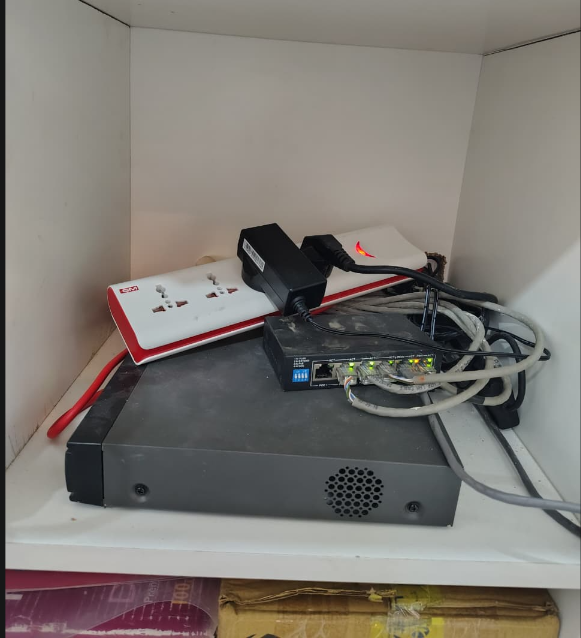
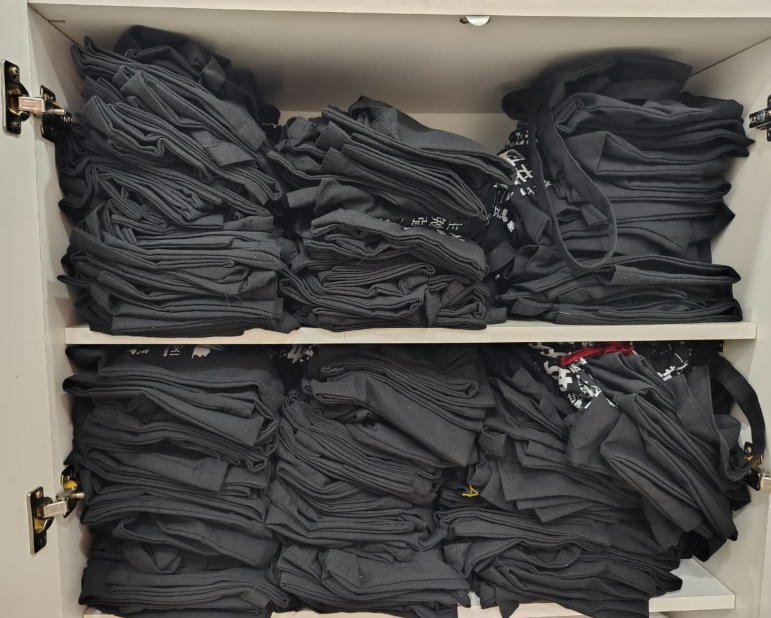
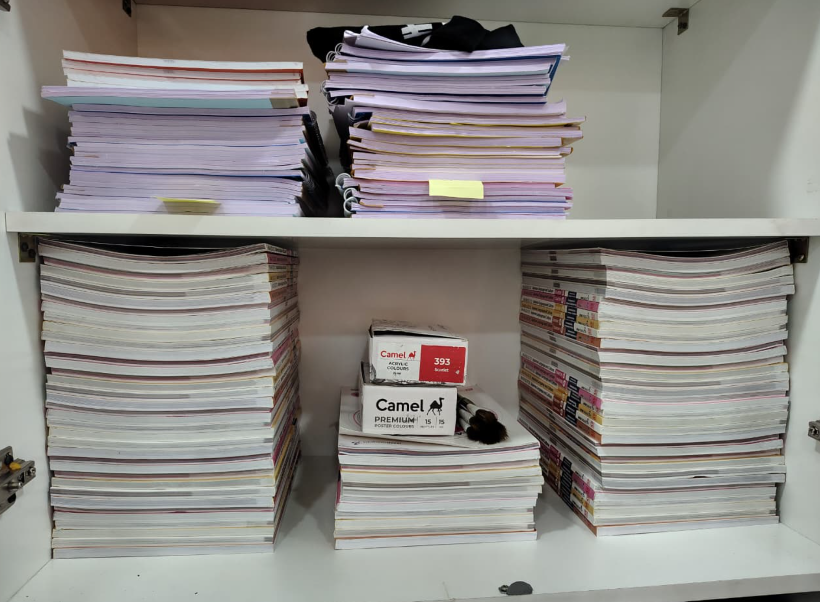
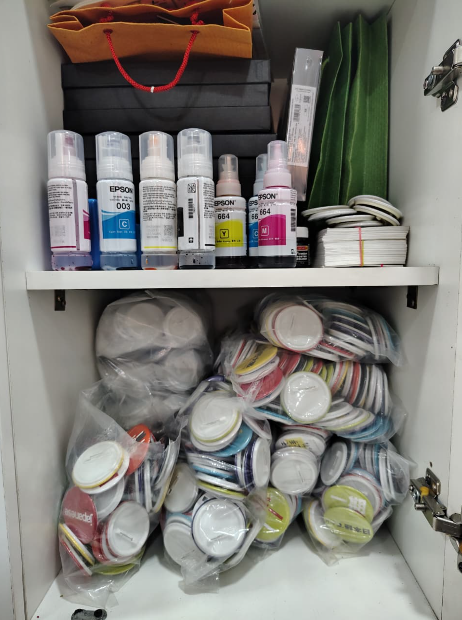
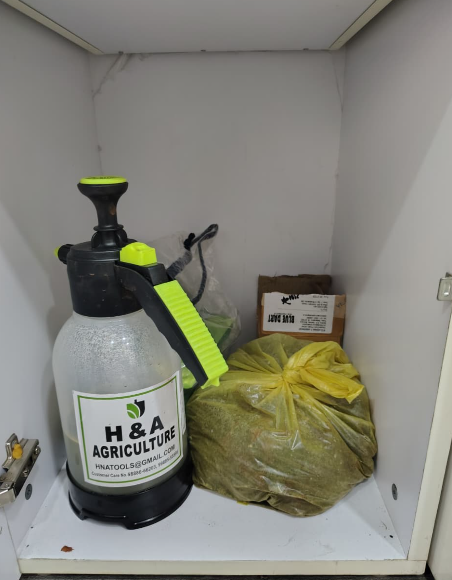
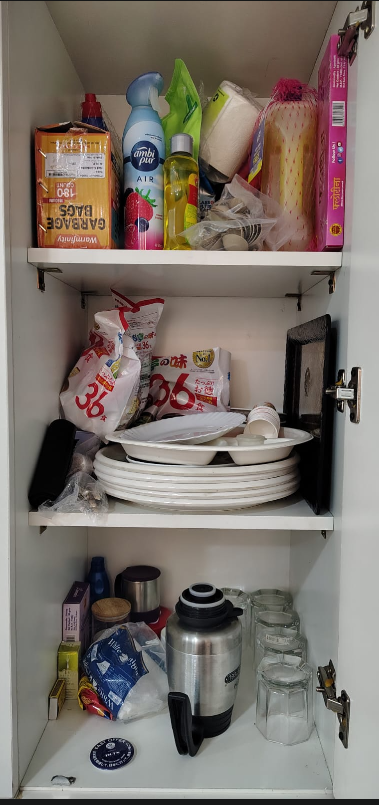
Fixed Location, Fixed Quantity #
What is the “Fixed Location, Fixed Quantity” system in the office? It refers to the practice of “eliminating waste in operations by placing the necessary supplies and materials in designated locations in specific quantities.”
Siddharth Tower 509 Office #
CCTV Unit
Tote Bags
Books
- Study material for all levels is kept in this section.
- We procure as we need.
- If stock is insufficient, contact Ganesh San.
Blank Papers for Print
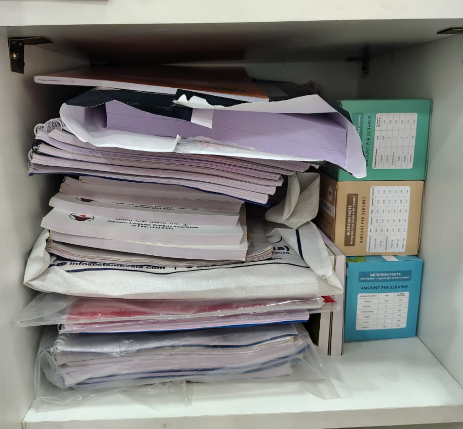
Flashcards & Brochures
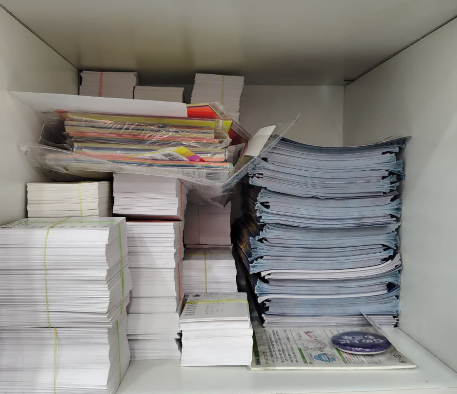
Printer Ink & Pin Badges
Gardening Stuff Contact: Vaijnath Gaikwad — 9763200281
Cleaning Stuff and Pantry
Appraisals and Increments #
Employee Appraisal and Increment Process — due in April each year.
- Review Employee Performance (Reporting Manager) — Check work quality, attendance, punctuality, attitude, and achievements.
- Manager’s Evaluation (Reporting Manager) — Provide feedback and a performance rating.
- Appraisal Discussion (Reporting Manager, Employee, HR) — Conduct a short meeting to discuss performance and future expectations.
- Decide Increment (Management / Director) — Based on performance, experience, and company budget.
- Increment Letter Preparation (HR) — Document the revised salary and effective date, and inform the employee via email.
- Records and Payroll Update (HR and Accounts) — Update employee records and payroll.
Timesheet #
Submission Rules
- Employees/Interns must submit their timesheets daily.
- All employees must update and submit their timesheet daily, before the end of the working day.
- Daily entries must accurately reflect the work completed and hours worked.
Template
| Date | Time | No. of Hours | Content |
|---|---|---|---|
Zoho Invoice Submission & Payment #
What is Zoho Invoice? Online invoicing software that helps the business create, send, and manage invoices. It’s useful because it:
- Creates invoices quickly and sends reminders.
- Sends invoices to consultants directly.
- Tracks payment easily.
- Saves time and reduces manual work.
- Keeps invoice records organized.
Submission and Payment Procedure
| Step | Owner | Description |
|---|---|---|
| Invoice Notification | Accounts | Teachers/Consultants receive an invoice email from the Zoho portal on the last day of every month. |
| Invoice Submission | Teachers/Consultants | Fill in and submit the required invoice details on the Zoho portal on the 1st day of the following month. |
| Invoice Verification | Accounts | Submitted invoices are reviewed and verified for accuracy and completeness. |
| Payment Processing & Credit | Accounts | Approved invoices are processed for payment; the amount is credited to the respective bank account on the 4th of every month. |